


 Back to News
Built Into macOS: How Phi Sentinel Uses Apple Foundation Models
On supported Macs, Phi Sentinel brings Apple Foundation Models into the browser as a native local AI path.
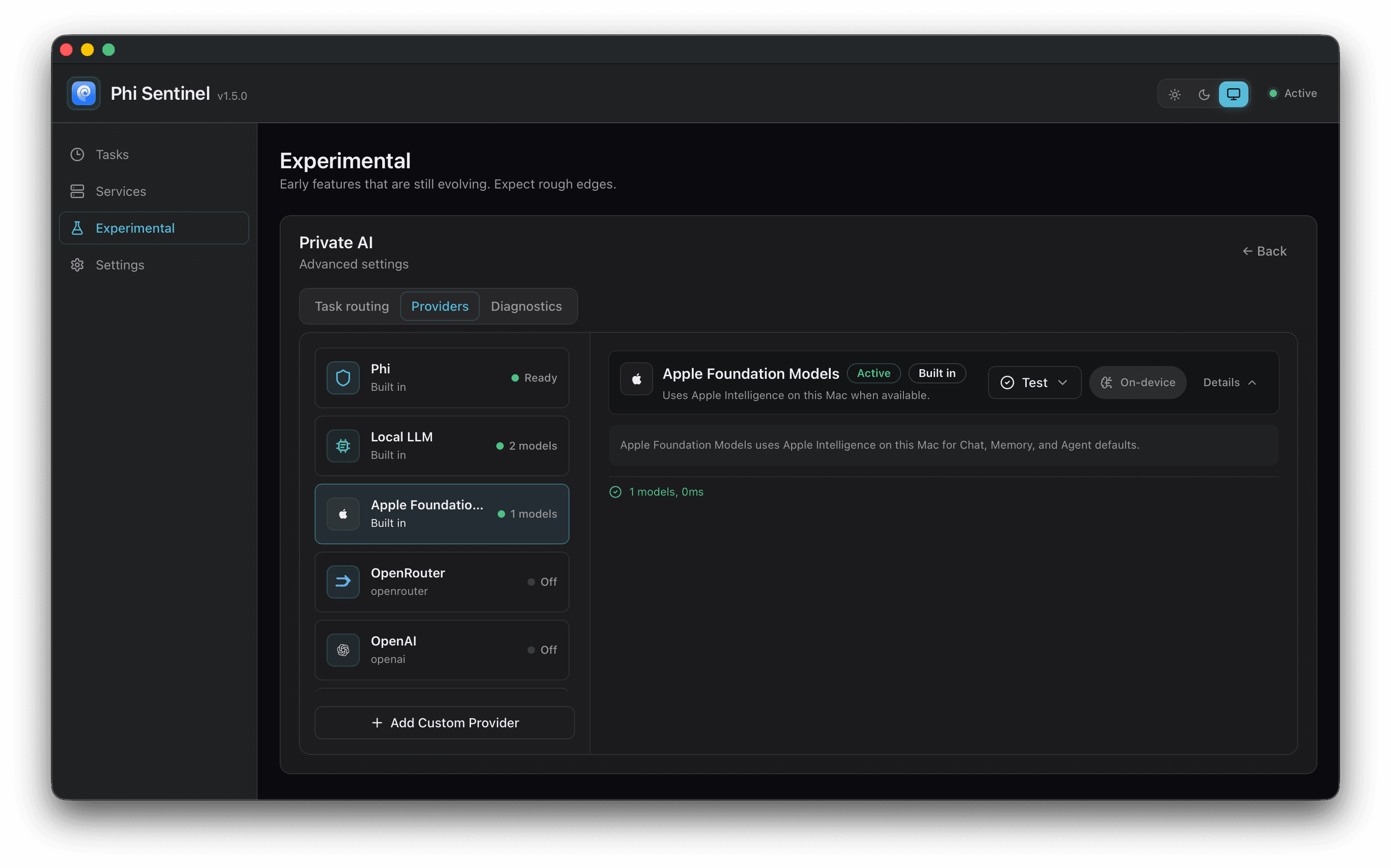
Phi is local-first because a personal browser should not need to send every thought through a remote server. The browser sees your tabs, your reading, your saved work, and the half-finished searches that somehow explain your week. If Phi is going to help with that context, the architecture has to earn trust.
Local LLM was one step: Sentinel can prepare local model files and use them for private background work. Apple Foundation Models adds another path. It is not a model Phi trains, ships, or hides inside the app bundle. It is a system capability provided by macOS on supported Macs with Apple Intelligence.
That matters because local AI often asks users to download extra pieces, choose a model, start background tools, and paste keys. Apple Foundation Models gives Phi a more native route for some local text work.
Sentinel Chooses The Path
Phi Sentinel is the local companion service behind Phi Browser. It starts the local background work, handles permission guidance, and tells the browser what is available on this Mac. For AI, Sentinel also acts as the chooser between the paths Phi already knows about: the Mac's system model when it is available, Phi's own local model setup, user-configured AI sources, and Phi Cloud.
Sentinel does not treat all AI work as the same job. A small browser cleanup task may fit on the Mac. A larger feature may need another local model or the cloud. The browser should not have to ask the user to make that decision every time.
What Apple Foundation Models brings
Apple Foundation Models gives Sentinel a system-provided on-device model path. In practice, that means Phi can ask the Mac for help when macOS says its built-in model is ready.
Sentinel does not ask the user to configure a server, enter a URL, or paste a new key for this path. Release builds include a small signed piece of the app that asks macOS whether the system model can be used. If the answer is yes, Sentinel can offer that path to Phi. If the answer is no, Phi keeps working through its other paths.
For users, the product shape is simple:
- no separate model download for this path;
- no local AI engine to install;
- no local server to start;
- no extra API key to paste;
- no need to know what port the system model lives behind, because it does not work that way.
It still has limits. Apple Foundation Models is only available on supported Macs, with a compatible OS and Apple Intelligence enabled. The model may also need time before macOS reports it as ready. Sentinel treats those as normal availability states, not as mysterious AI weather.
How Sentinel Connects To It
Apple does not hand apps a model file to open. The model belongs to macOS. Phi's job is to ask the system for help in the right way, then stay out of the way while the Mac does the work.
Sentinel handles that with a small native bridge that ships inside the app. It is signed with the rest of Phi, lives next to Sentinel's background process, and has one narrow job: talk to macOS about Apple Foundation Models.
The bridge first asks the Mac whether Apple Foundation Models can be used. A supported Mac may still need Apple Intelligence turned on, a newer OS, or time for the system model to become ready. Sentinel turns those system answers into plain messages instead of making the user guess.
Second, when Phi has a small task that fits this path, Sentinel packages the request and hands it to the bridge. The bridge starts a short conversation with the system model. The model still runs as part of macOS. Phi is not loading Apple's model into its own app, and it is not shipping a copy of it.
Third, when macOS returns an answer, Sentinel gives the result back to Phi Browser in the same shape Phi expects from its other AI paths. That is why the feature can sit inside the existing browser experience. The Mac supplies the model, Sentinel does the routing, and Phi shows the result.
When Sentinel uses it
Apple Foundation Models currently fits small text work. It does not cover the whole Phi AI surface.
When a supported task can use Apple Foundation Models and the Mac reports that the system model is ready, Sentinel sends that work to the Mac. The browser does not need a special setup screen for it. Apple Foundation Models is one path inside Phi's local-first routing, not a separate product bolted onto the side.
We are also conservative about where this appears in the product today. Apple Foundation Models can only hold a smaller amount of context than the paths Phi uses for larger work, so we currently use it in one narrow place: AI tab organization. On a supported Mac, press 「Control + Shift + G」 in Phi Browser if you want to try this little hidden switch. Treat it as a small easter egg. It may take a while to respond, so give the Mac a moment before assuming nothing happened. We will keep improving the prompts, path selection, and speed as the system path matures.
Why Tabs First
Tab organization is a good first place for this system path because the task is small, visible, and easy to judge. Phi can look at a set of open tabs, suggest groups, and let the user decide whether the result makes sense.
That shape matters. We do not want to start by asking a small system model to carry a whole browsing session, a long agent plan, or a pile of private context it cannot hold well. Starting with tabs lets us learn where Apple Foundation Models feels useful inside Phi.
It also gives users a low-risk way to try the feature. If the result is helpful, great. If it is a little slow or a little odd, no one has entrusted it with the keys to the kingdom. The tabs will survive.
How this relates to Local LLM
Local LLM is still the path for models Phi downloads and runs itself. It remains the right fit when Phi needs a managed local model for work the system model does not cover.
Apple Foundation Models is different. Sentinel does not download model files for it or manage the model itself. macOS owns the system model, and Sentinel asks whether it can be used.
So the relationship is additive. Local LLM gives Phi a managed local setup. Apple Foundation Models gives Phi a native system-model path. Phi Cloud keeps features available when local paths are not ready, not selected, or not suitable for the task.
Why this matters
Phi is not trying to declare one model winner. Browsing work is too varied. Some tasks fit on the Mac. Some need a larger model. Some need to stay available even when a local path is not ready.
Apple Foundation Models helps with the last part. On supported Macs, Phi can use a local model capability the system already provides.
We will keep being careful about scope. This does not mean every Phi AI feature is local. It does not mean every Mac can use Apple Foundation Models. It gives Phi a more native local path where the system can provide one.
That is the direction: local where practical, explicit when not, and boringly clear about which path handled the work. Boring clarity is underrated. It is also how trust survives contact with real software.