


 Back to News
Arc Browser Alternative for Mac: Meet Phi Browser
Arc shuts down on December 22, 2026. Phi is an Arc Browser alternative for Mac that keeps the sidebar, Spaces, and Split View, migrates your Arc setup directly, and adds built-in AI plus local-first memory.
If you are looking for an Arc Browser alternative, you now have a deadline. On October 22, 2026, The Browser Company announced that Arc is sunsetting: on December 22, 2026, Arc for macOS and Windows stops working, accounts are deactivated, and the personal data tied to them is deleted within 30 days. (Arc, TechCrunch)
For a lot of Mac users, that is hard news. Arc changed how a browser could feel — a sidebar instead of a tab strip, Spaces to separate work from life, Split View for real multitasking — and those habits do not go away just because the app does. You do not want to relearn everything in vanilla Chrome. You want a browser that keeps what made Arc good and has a future.
That is where Phi Browser fits. Phi is the browser that knows you, and gets things done — an intelligent, native browser for macOS, built on the Chromium engine, with an open-source core and your data kept local-first. It keeps the Arc-style sidebar workflow, moves your whole Arc setup over directly from your Mac, and adds a layer of built-in AI and memory that Arc only ever gestured at.
What the Arc shutdown means for you
| Date | What happens |
|---|---|
| October 22, 2026 | Shutdown announced; new Arc accounts can no longer be created |
| November 23, 2026 | Arc Search on iOS and Android loses its AI features, sign-in, and tab sync |
| December 22, 2026 | Arc stops working on Mac and Windows; accounts are deactivated and personal data is deleted within 30 days |
The company's reason is the cost of keeping a browser safe: "Keeping a browser secure takes constant, dedicated work that is only increasing in the age of AI." Arc's feature development had already stopped in 2025, and the team's work now goes into Dia.
The practical takeaway is simple: move while Arc still opens. Whichever browser you choose, move your data before December 22, so you can check that your Spaces, bookmarks, and logins came across while Arc is still there to compare against.
Dia or Phi?
The Browser Company points Arc users to Dia, its AI-first browser, and for some people that will be the natural next step. It comes from the same team, its importer carries over your Arc data including passwords, Arc's features stay free there, and AI is optional.
Phi is for Arc users who want something different from where Dia is heading:
- Spaces stay Spaces. In Dia, Arc's Spaces become Profiles. Phi keeps the two ideas apart, the way Arc did: Spaces are the workspaces you switch between, and Profiles are the logins underneath them.
- Air Traffic Control lives on. Phi's URL Rules send links to the Space you assign automatically, wherever you click them.
- Real bookmarks come back. A full bookmark tree with folders, alongside the pinned tabs you already rely on.
- Your memory stays on your Mac. Phi's AI learns how you browse, but that memory is stored locally, and you can view, edit, or delete it.
- A browser built around you. Dia is now part of Atlassian and focused on knowledge work. Phi is built around one person's browsing, on the Mac.
And you do not have to decide perfectly the first time: Phi can import from Dia too, so trying Dia first never locks you in.
What Phi keeps that Arc users already love
The hardest part of leaving Arc is losing the muscle memory. Phi is built around the same core ideas, so most of it will feel familiar on day one.
- A vertical sidebar, not a tab strip. Phi's sidebar is the primary navigation surface, the same shape Arc popularized. If Arc's sidebar model worked for you, Phi will feel like home.
- Spaces for separate contexts. Phi has Spaces — named, colored workspaces in the sidebar for work, personal, side projects. Underneath them sit Profiles, which hold the actual isolation (cookies, history, logins, extensions). One Profile can back several Spaces, so you can switch contexts in a single click while still keeping accounts separate when you need to.
- Split View. Open two pages side by side in one window, and even pin or bookmark that pair as a single unit.
- URL Rules, inspired by Arc's Air Traffic Control. Matching sites can open automatically in the Space you assign, or ask you where they belong — the same "put links in the right place" idea Arc users relied on.
- Bookmarks that actually stay. Arc dropped traditional bookmarks in favor of pinned tabs and Favorites. Phi keeps both: a full bookmark tree with folders and pinned tabs at the top for the pages you live in. Bookmarks open in place as living tabs rather than spawning throwaway ones.
And because Phi is built on Chromium, the web works the way you expect, and you can bring your extensions across.
Move your whole Arc setup over before December 22
Phi does not just import Arc's data. It migrates your Arc setup. Choose Migrate from Another Browser… in the Phi menu and pick Arc. Phi reads Arc's own sidebar on your Mac and rebuilds it: every Arc Profile becomes a Phi Profile, and every Space comes back with its name, color, and icon, in the same order. You do not sign in to an Arc account, export HTML files, or rebuild anything by hand.
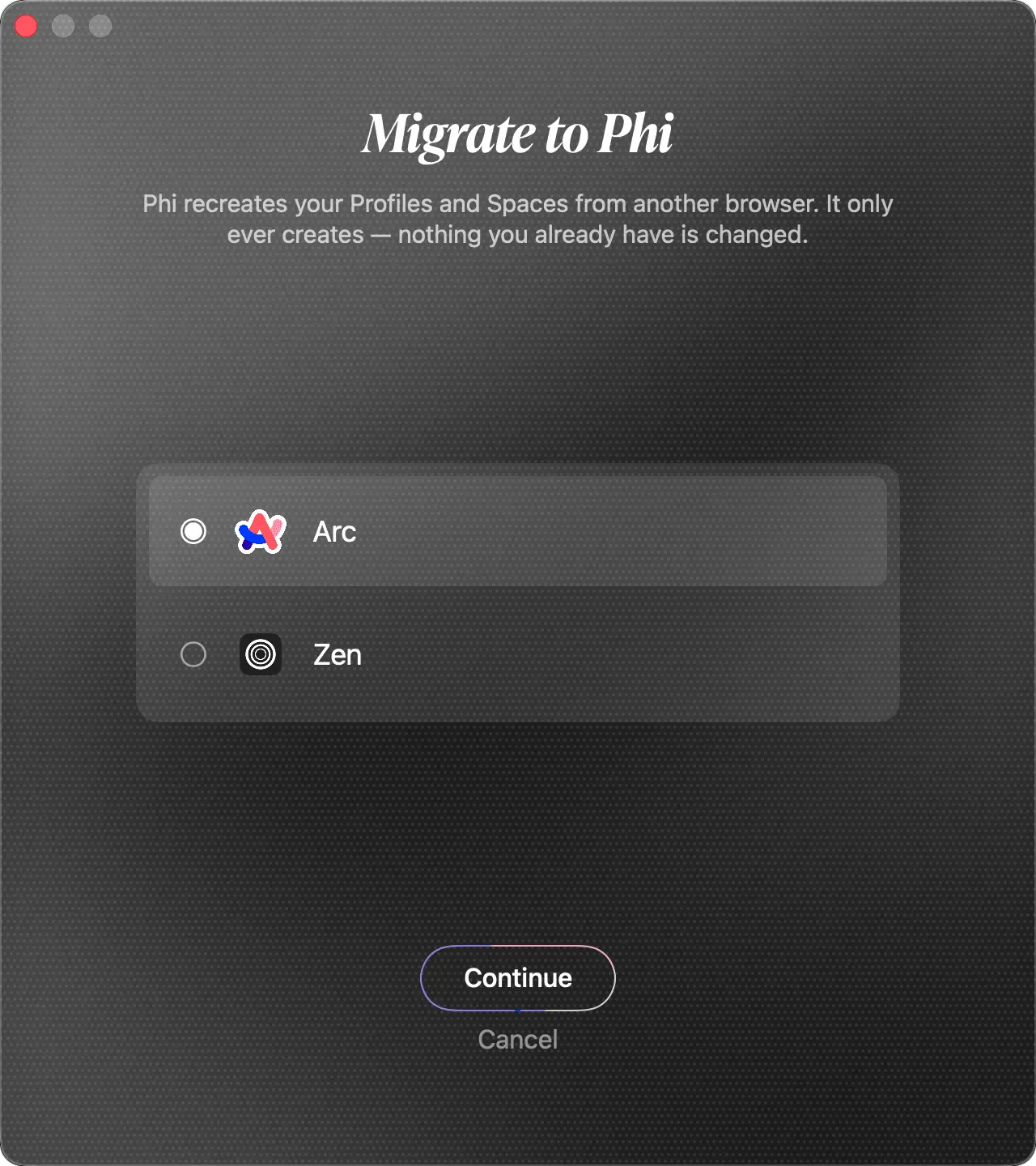
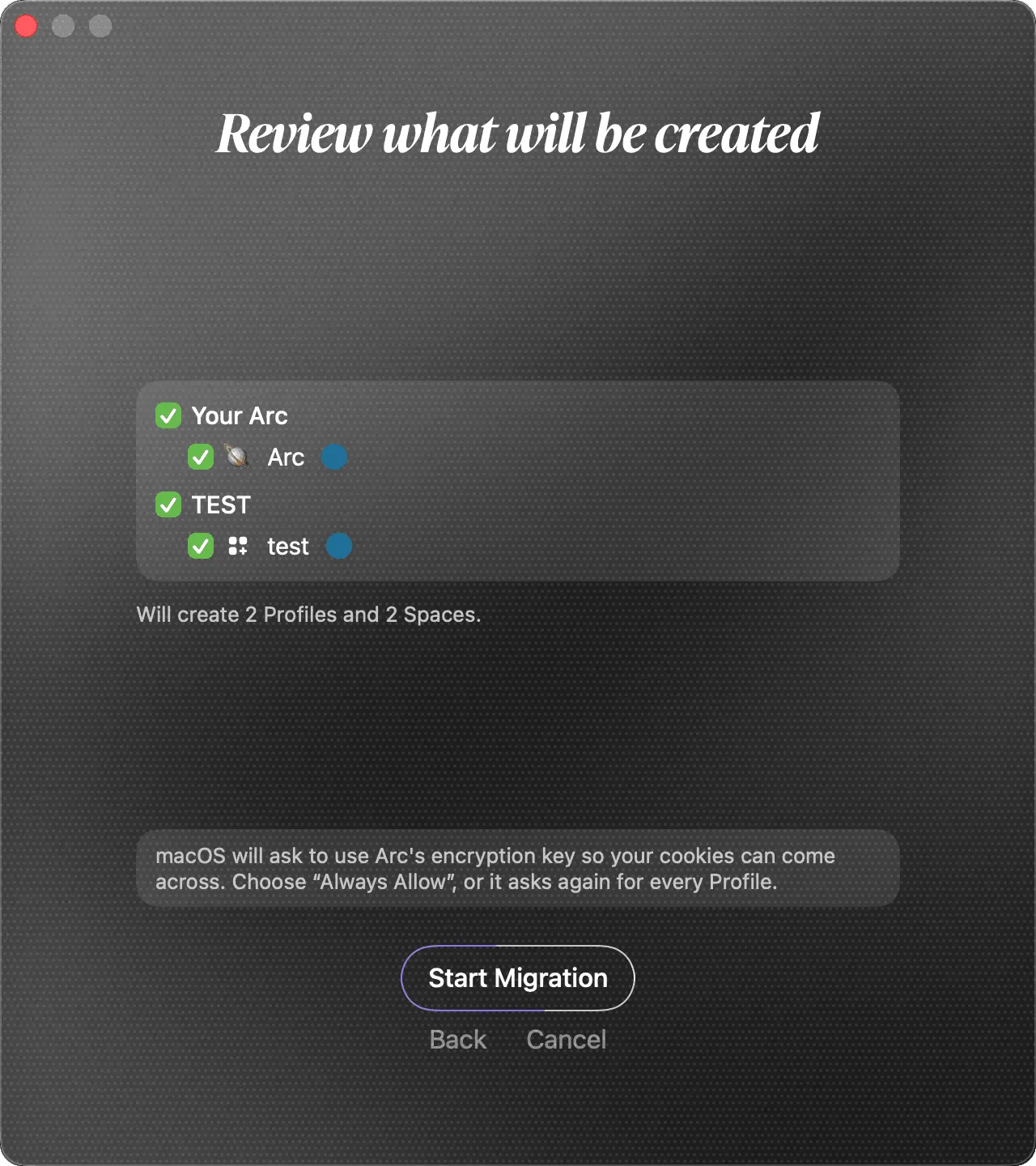
Before anything changes, Phi shows exactly what it will create. Untick any Profile or Space you want to leave behind, then start the migration. Migration only ever creates. Nothing you already have in Phi is changed, so it is safe to run even after you have started using Phi.
| From Arc | In Phi |
|---|---|
| Profiles | One Phi Profile for each Arc Profile |
| Spaces | Spaces with the same name, color, and icon, in Arc's sidebar order |
| Favorites | Pinned tabs, with Split View pairs kept together |
| Each Space's pinned tabs | That Space's bookmarks |
| Browsing history and cookies (stay signed in to sites) | Yes, for each Profile |
| Extensions | Installed again in the matching Profile |
| Saved passwords | Not migrated: use your password manager. Phi offers iCloud Passwords during setup |
When the migration reaches your cookies, macOS asks whether Phi may use Arc's encryption key. Choose Always Allow, or macOS asks again for every Profile. Passwords stay with the password manager you trust rather than moving between browsers, so set that up once and every browser you use can share it.
If you only want a few things, such as the bookmarks from one Profile, use the lighter Import from Another Browser… in the same menu. It is also offered during first-run setup and lets you pick individual data types instead of moving your whole setup.
Where Phi goes further than Arc
Keeping Arc's workflow is the price of entry. What makes Phi worth switching to is the layer Arc never finished: an AI browser that is actually built into the browser, and a memory that is yours.
- A built-in assistant, on by default. There is no separate "AI app" and no extra account to create. During setup you give the assistant a name, and it is right there — ask it about the page you are reading, summarize tabs, or attach a whole Tab Group or Split View as context for a question.
- Memory that understands you, stored locally. Phi learns from how you actually browse, not just what you type into a chat box, and builds a private map of your interests you can explore in Nebula, Phi's visual memory map. Crucially, that memory lives on your device, you can view, edit, or delete it, and it is never used to train models. If switching browsers still feels like a big leap, start with Anamnesis: it is a standalone Chrome extension that extracts Phi's new tab page and Memory system, so you can try the memory layer first before moving your whole browser workflow.
- Automation that keeps working when you are not watching. Phi can run tasks in the background ("Shadow Tasks") and on a schedule — monitor a price, watch a page for changes — and it pauses for confirmation on anything consequential.
- Reach it from your phone. Phi Link connects the assistant to Telegram, so you can hand it a task or get a completion notification while you are away from your Mac.
- Private AI, if you want it. On a capable Mac you can run models locally or point Phi at Ollama, LM Studio, or any OpenAI-compatible endpoint, so the AI itself never has to leave your machine.
Put together, Phi behaves less like a browser with a few AI features bolted on and more like a system that quietly keeps working for you — with privacy as the default, not an afterthought.
Arc vs Phi at a glance
| Arc | Phi Browser | |
|---|---|---|
| Status | Stops working December 22, 2026 | Actively developed |
| Platforms | macOS + Windows | macOS (Apple Silicon, macOS 14+) |
| Engine | Chromium | Chromium |
| Sidebar / Spaces / Split View | Yes | Yes |
| Link routing to Spaces | Air Traffic Control | URL Rules |
| Traditional bookmarks | Replaced by pinned tabs | Full bookmark tree and pinned tabs |
| Migration from Arc | — | Profiles, Spaces, pinned tabs, bookmarks, history, cookies, extensions |
| Built-in AI assistant | Arc Max features | Assistant on by default, no separate account |
| Personal memory | No | Yes, stored on your Mac |
| Background / scheduled automation | No | Yes |
| Price | Free | Free, AI included |
How to switch to Phi
- Download Phi — grab the
.dmgfrom the site, or install with Homebrew:brew install --cask phibrowser/tap/phi. - Migrate from Arc while Arc is still installed and before December 22. Once Phi is set up, choose Migrate from Another Browser… in the Phi menu, pick Arc, review the Profiles and Spaces it will create, and start. For logins, choose iCloud Passwords or your own password manager.
- Start in Balanced Mode. If you are coming from Arc, the vertical sidebar is probably already your default way to browse. Balanced keeps tabs, pinned tabs, bookmarks, and Spaces in the sidebar while leaving the address bar visible above the page. Move to Performance mode later if you want the leanest, most Arc-like layout; use Comfortable only if you temporarily want a traditional top tab strip.
- Meet your assistant once the basics click, and let Phi's memory start working for you.
Arc showed what a browser could be. Phi is built on those same ideas and keeps moving them forward — and with Arc going dark on December 22, now is the time to bring your Spaces somewhere they can keep growing.