


 Back to News
Local First: How Phi Browser's Local LLM Works
Phi is local-first because personal AI requires personal trust. Local LLM is not just a feature toggle. It is part of the architecture we are building toward.
Phi Browser is built around a simple idea: your browser should become more useful as it understands more about you, but that understanding should not automatically mean sending more of your life to someone else's server.
That is the local-first principle behind Phi. The browser can remember, organise, summarise, search, and act on your behalf, but wherever possible, the work should happen on your own machine first. Local LLM support is one concrete step toward that goal.
Most AI features today work by sending your content to a cloud service somewhere. That can be convenient, but it also means your browsing context, personal notes, page content, and activity patterns may need to leave your device before anything useful can happen. Phi's Local LLM feature takes a different path. It runs the AI model directly on your Mac, so more of the work can happen privately, locally, and under your control.
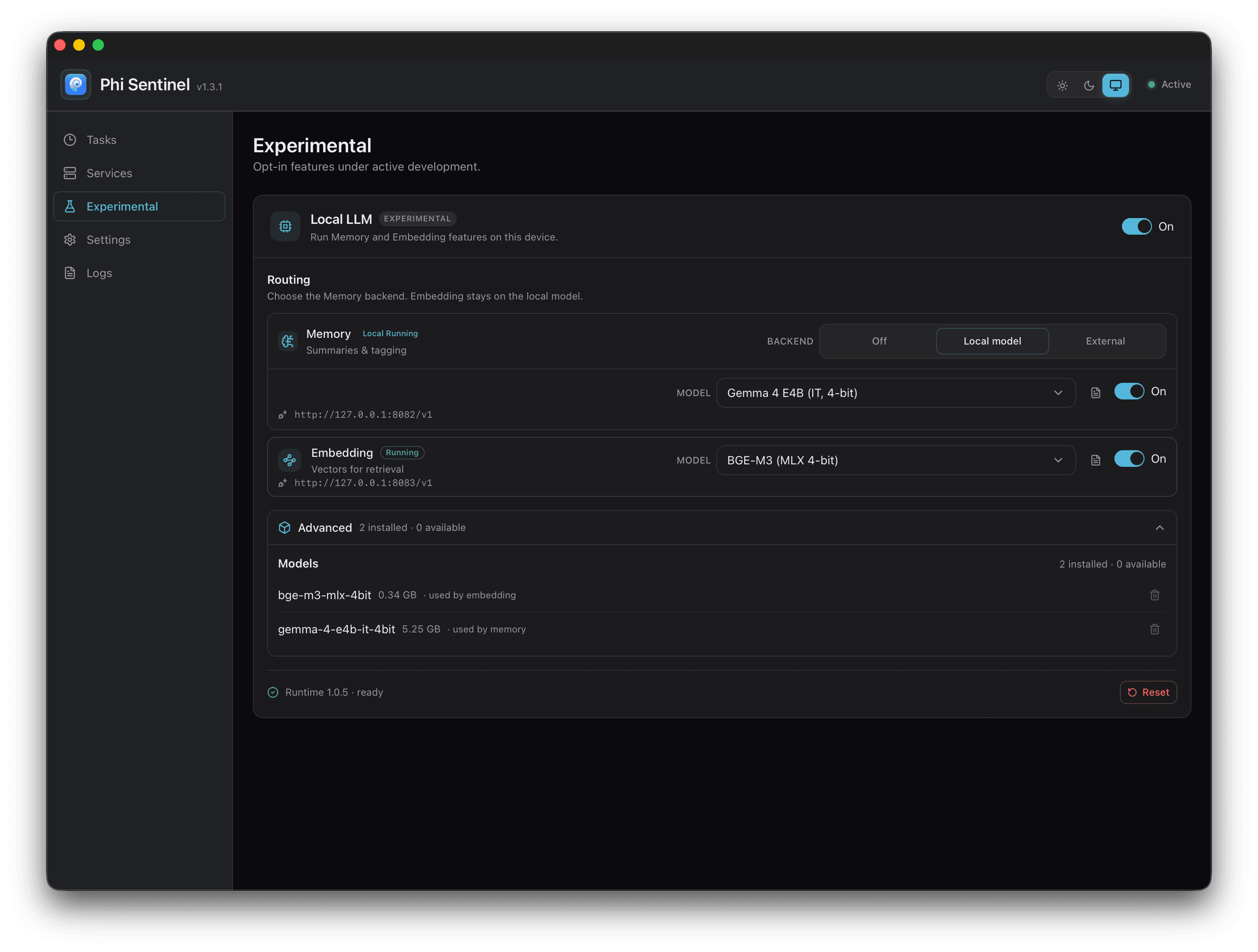
At of Phi Browser v1.3.1, Local LLM is available as an experimental feature under Phi Sentinel, the local background service that helps Phi handle memory, indexing, and scheduled work. You can enable it from Phi Sentinel's settings. Once switched on, Phi will prepare the local runtime and model files it needs, then start using them for supported local tasks.
Here is what actually happens when you turn it on.
An AI model that lives on your Mac
When you enable Local LLM, Phi sets up a small AI model that runs entirely on your own hardware. Today, it powers two important behind-the-scenes jobs.
The first is memory. Phi can write short summaries and tags for things like your browsing activity, helping it keep track of what may matter to you over time.
The second is embedding. This turns your content into a form that can be searched by meaning, not just by exact keywords. More on that in a moment, because apparently even browsers now need a tiny semantic philosophy department.
Both jobs run locally. The content does not need to be uploaded to perform this work.
This matters because Phi's memory is not supposed to be a decorative feature. The longer-term goal is for Phi to become genuinely personal: to understand your patterns, your projects, your recurring interests, and the things you keep returning to. That kind of product only works if the user can trust the architecture underneath it. Local LLM is part of making that trust practical, not just something written in a privacy policy and then immediately betrayed by six analytics SDKs wearing fake moustaches.
A one-time setup download
To keep the Phi Browser app itself small, we do not ship the AI runtime and model files inside the main download. Instead, when you switch on Local LLM, Phi fetches the pieces it needs.
It downloads a lightweight runtime, which is the engine that knows how to run AI models, and one or more models, which are the actual files that perform the AI work.
Each download is checked against a known fingerprint, or checksum, as it arrives. This lets Phi confirm that the files are exactly the ones expected and have not been corrupted along the way. If your connection drops mid-download, Phi can resume instead of starting again from zero, because apparently even software should be allowed one small act of mercy.
You will see live progress for each stage, including downloading, extracting, and verifying, directly inside the app.
Built for Apple Silicon
Local LLM currently runs on Macs with Apple Silicon, meaning M-series chips. It uses MLX, Apple's machine-learning framework, which is designed to take advantage of Apple Silicon's unified memory architecture and on-device acceleration.
That is what makes it practical to run a useful AI model on a laptop or desktop Mac without needing a separate server.
Once installed, the model runs quietly as a local service on your Mac. Phi talks to it through your machine's internal loopback connection, so the request stays inside your device rather than travelling across the network. As an additional safeguard, the model process is blocked from reaching the internet.
In other words, the model is there to help your browser understand your local context, not to become another suspicious little pipe to the cloud. The world has enough of those already.
What embeddings actually mean
"Embeddings" sounds more complicated than it needs to be. The basic idea is simple.
An embedding turns a piece of text into a list of numbers that captures its meaning. Two things with similar meanings end up with similar numbers, even if they do not use the same words.
That is what allows Phi to search by intent instead of only by keyword. You might ask for something like "places I read about travel," and Phi may be able to surface a page about flight deals, hotel planning, or a destination guide because the meaning lines up, even if the exact word "travel" was never used.
For example, Phi may remember that you were researching local-first note-taking tools last week, even if the pages themselves used phrases like "personal knowledge base," "offline markdown," or "private workspace" instead of the exact words you later search for.
With Local LLM enabled, this conversion happens on your Mac. The content being indexed can stay on your machine, while Phi still gains the ability to understand and retrieve it more intelligently.
If the local model is not ready
Local setup can take a few minutes, and you may choose to disable it later. Phi is designed not to break when that happens.
If the local model is not available, Phi can fall back to its cloud service so the relevant features continue working. When the local model comes back online, Phi switches back automatically.
This gives you flexibility. You can use local AI when you want privacy and on-device processing, while still having a working product if the local model is still being installed, temporarily unavailable, or not powerful enough for a particular task.
Local-first does not mean pretending the cloud does not exist. It means using local processing wherever it makes sense, giving users more control, and moving more of Phi's intelligence closer to the device over time.
Bring your own model
If you already run AI models locally with tools such as Ollama or LM Studio, Phi can connect to those instead.
In that setup, Phi does not need to download and manage its own model. It can use the local model server you already have running. The principle remains the same: your data stays on your machine, and Phi uses local AI infrastructure where available.
This is especially useful for people who already have a preferred model, a tuned local setup, or a machine powerful enough to run something larger than Phi's default local model.
A note on resources
Running an AI model on your own hardware is not magic. Deeply disappointing, yes, but true.
It uses memory and battery while active, and larger models use more of both. The benefit is that the work happens on your Mac instead of someone else's server. The trade-off is that your Mac has to do the work.
We tested Local LLM on a base-model M4 Mac mini with 16GB of memory, and it runs comfortably there. Treat that as a rough baseline. On older Macs or machines with less available memory, you may see slower responses or heavier resource use.
That is the nature of local-first software. You gain privacy, control, and offline capability. In exchange, your own device carries more of the workload.
Phi lets you turn Local LLM on and off whenever you like. The choice stays with you, which is where it should have been all along.
Looking forward
Local LLM support is still experimental, and we are being careful about where we use it.
For now, it covers memory and embeddings. These are well-bounded tasks: summarising, tagging, and turning content into searchable meaning. They are a good starting point because they let Phi move important personalisation work onto your Mac without needing to rebuild the entire AI stack at once.
Other Phi features, such as chatting with tabs and more advanced agentic workflows, are not fully local yet. Those features involve more moving parts: multiple models, tool calls, page context, browser state, task planning, model routing, performance optimisation, and a fair amount of glue code that nobody should have to think about unless they have angered the software gods.
We do want to bring more of that work local over time. But doing it properly means more than pointing the browser at a local model and hoping for enlightenment. It means making sure local models are fast enough, capable enough, and coordinated enough to handle real browser tasks without turning your Mac into a space heater with tabs.
Once the Local LLM system is ready for broader use, we plan to graduate it from an experimental Phi Sentinel feature into a more integrated part of Phi Browser itself.
That is the direction we are building toward: a browser that becomes more personal, more useful, and more capable while keeping more of its intelligence on your own machine. Local LLM is not the final destination, but it is an important step toward the kind of browser Phi is meant to become.